Creating Pizza Cut and Modify Portions
Sign into the Back Office and select a Store.
On the left-side Navigation Panel, click Products/Items then Cut and Modify.
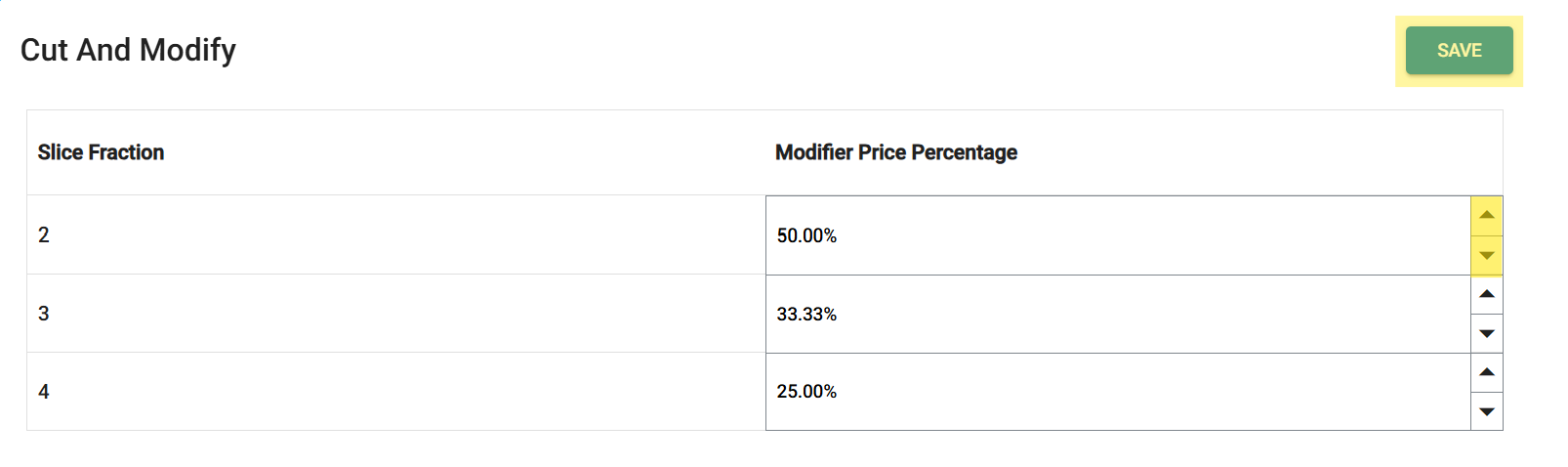
On the Cut And Modify screen, update an existing Slice Fraction by clicking the upwards facing triangle ▲ to increase or downwards facing triangle▼ to decrease the Modifier Price Percentage. Once your updates are complete, click Save.
Related Articles
Back Office: Cut and Modify Products/Items
Sign into the Back Office and select a Store. On the left-side Navigation Panel, click Products/Items then Cut and Modify. On the Cut And Modify screen, update an existing Slice Fraction by clicking the upwards facing triangle ▲ to increase or ...
Creating Modifier Groups
Sign into the Back Office and select a Store. On the left-side Navigation Panel, click Products/Items then Modifier Groups. The Modifier Groups screen appears. Modifier Group Table If a Modifier Group was imported, it will be automatically populated ...
Creating Products/Menu Items
Sign into the Back Office and select a Store. On the left-side Navigation Panel, click Products/Items then Products/Items. Creating a New Menu Item On the Products/Items screen, click + New Menu Item or click the ••• under Actions to Edit, Copy or ...
Creating Department
Sign into the Back Office and select a Store. On the left-side Navigation Panel, click Products/Items then Departments. The Departments screen contains the Departments table with the following columns: Name – The name of the department (entered when ...
Creating Modifiers
Sign into the Back Office and select a Store. On the left-side Navigation Panel, click Products/Items then Modifiers. On the Modifiers screen: create a New Modifier by clicking + NEW MODIFIER or update an existing Modifier by clicking the pencil ...