POS: Bar Tab - Split
This option is used to split the Check for different Seats. When the Split option is selected on the Bar Tab screen, you will be taken to the Split Check screen.
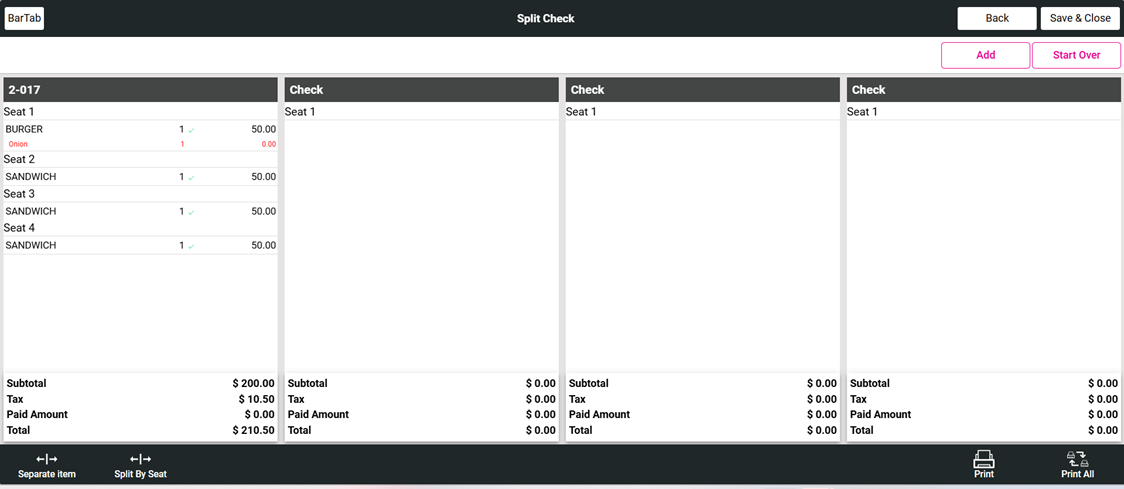
For more information on Splitting Checks, see the Split Checks Knowledge Article.
Related Articles
POS: Bar Tab - Overview
A Bar Tab is a convenience for both Bartenders and their Customers. By opening a Tab, it allows you to order a Drink while not having to perform a Transaction for each Drink. This helps everyone by saving time - and frees up the Bartender to perform ...POS: Bar Tab - Floating Tab
To use a Bar Tab for a purpose other than at a Bar, the Floating Tab setting in the Back Office can be used to change the name of the Tab and the Order Type in the POS. Back Office Navigation: Log into BO, then for your Store select Settings > ...POS: Table Layout - QR Payment
Back Office Front End Receipt Navigation: Log in BO then select Settings > Printer Templates > Front End Receipt On the Front End Receipt Template Settings page: Select the corresponding checkbox for Show QR Payment. An example of the QR Code will ...POS: Operation - Till Management
Navigation: Log in to POS, then select Operations > Till Management Till is the money trays that fit into the Cash Drawers. They help Owners and Managers to keep track of the Cash that passes through their business daily. When ordering from the Order ...POS: Bar Tab - New Tab
This option is to create a new Check for the Bar Tab service type. When you tap on the New Tab option, the Order screen appears. Pre Auth If the Pre-Auth setting is enabled in the Back Office (Settings > General Settings): upon starting a new Bar Tab ...