POS: Check Options - View the EBT Balance
Back Office Prerequisites
- SPPAX Payment must be configured in under the Payment Settings page in Back Office.
- The EBT toggle must be enabled under the SPPAX Payment configuration section in Back Office.
POS
- Add the Menu Item(s) then select Option at the bottom bar.
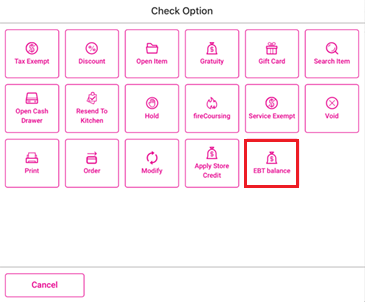
- On the Check Option window that appears, select EBT balance.
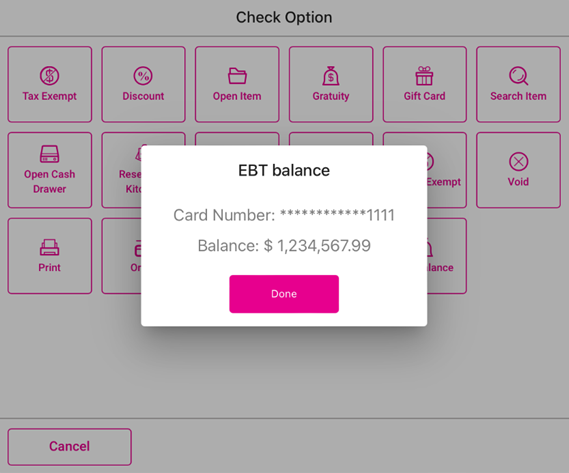
- Swipe the card on the connected SPPAX device. If the SPPAX device is connected to the POS, the EBT balance window appears, containing the following information:
- The Card Number appears, containing the last 4 digits of the card number and the rest of the numbers masked by asterisks (*).
- The Balance in pre-set currency.
- If no SPPAX device is connected to the POS, the message 'No pax device is connected to this POS' appears.
Related Articles
POS: Uber Eats Integration
For more information on the Uber Eats (UE) Integration, see the Uber Eats Knowledge Article. Uber Eats Orders Appearing in POS Once an Order is placed from Uber Eats, the message ‘You have 1 online order’ appears in POS. The Check will be listed ...
POS: EBT Balance Option in POS
Back Office Enabling EBT for a Menu Item Navigation: Log into Back Office, then select Home > Product/Items > Product/Items Select a Menu Item that qualifies to be eligible. On the (1) Basic Details page under the Tax section, enable the EBT Menu ...
POS: Check Options - Store Credit
Back Office Requirements Store Credits Report - For more information, see the Discounts Report article. Note: For Store Credit, the value in the Source column will be either POS or Call Center. Roles - For more information on a Customer's Store ...
POS: EBT Menu Item Payments
Back Office Enabling EBT for a Menu Item Navigation: Log into Back Office, then select Home > Product/Items > Product/Items Select a Menu Item that qualifies to be eligible. On the (1) Basic Details page under the Tax section, enable the EBT Menu ...
POS: EBT Menu Item Payments
Back Office Enabling EBT for a Menu Item Navigation: Log into Back Office, then select Home > Product/Items > Product/Items Select a Menu Item that qualifies to be eligible. On the (1) Basic Details page under the Tax section, enable the EBT Menu ...